What’s new for UltEvents?
- We’ve officially upgraded to UltEvents 3! What does this mean?
- We can directly edit fields, private or public
- Constructors have been fixed
- New UI
- UltEvent Holders now include an InvokeIf(bool condition)
- Return value filtering has been changed and is not as strict anymore. You can now use any system
objectas a return value for any argument as well as anything your argument type inherits or is inherited by like normal. (For example, you can now plug in aComponentfor an argument that requires aRigidbody)
With this update, Cam at SLZ added a whole bunch of new helpers directly to be used in UltEvents to allow things that were either extremely complicated and unperformant or just impossible.
New Components
Value Holders
- Value holders allow us to store any value.
- Value holders include:
- Bool Holder
- Float Holder
- Int Holder
- String Holder
- Vector2 Holder
- Vector3 Holder
- Quaternion Holder
- Object Holder (UnityEngine Object)
- System Object Holder (Allows to store any value, not serialized)
List Holders
- List holders allow us to interact with arrays and lists.
- List holders can be set from and be converted to arrays.
- List holders include a foreach event (Invoked with
ForEachEvent()). The event includes two parameters, the current value and current index. The event will be triggered for every single item on the list. - They also include methods to directly set or get values using an index.
- List holders include:
- Bool List Holder
- Float List Holder
- Int List Holder
- String List Holder
- Vector2 List Holder
- Vector3 List Holder
- Quaternion List Holder
- Object List Holder (UnityEngine Object)
- System Object List Holder (Allows to store any value, not serialized). This holder also implements a special method to set from an Array.
Operators and Accessors
The classes mentioned above are two of the main three static helper classes added in this update. The third one will be covered on later on. See Reflectors.
Operators is a base UltEvents class, shipping with UltEvents 3. It was heavily modified to include things to help us modders. The class includes math operations between common types (including Unity ones such as Vector3) and equality checks.
Accessors, as the name suggests includes helper methods to access values we can’t normally access. For example, we are able to use get individual axes of off Vector2s, Vector3s and Quaternions. We can also get and set array elements as well as a few other useful methods (Go try them out!).
Reflectors
The methods in this class let us call any method on any object (even returned values!) - static or not, generic, using out parameters, or doing flips in the air while screaming hooray - as long as it isn’t malicious.
There are also methods to access fields on any object.
This update includes heavy security fixes, blocking dangerous types that could lead to exploits or enable malicious calls. One of those types happens to be System.Type.
How does this affect us?
Since System.Type is completely blocked, we cannot use Type.GetType() anymore. This method is crucial for higher-level UltEvents.
This is where we refer to the Reflectors class. It includes a safe implementation of GetType() that allows us to get non-blocked types. This is required for the method invoking mentioned above.
How do we call methods then?
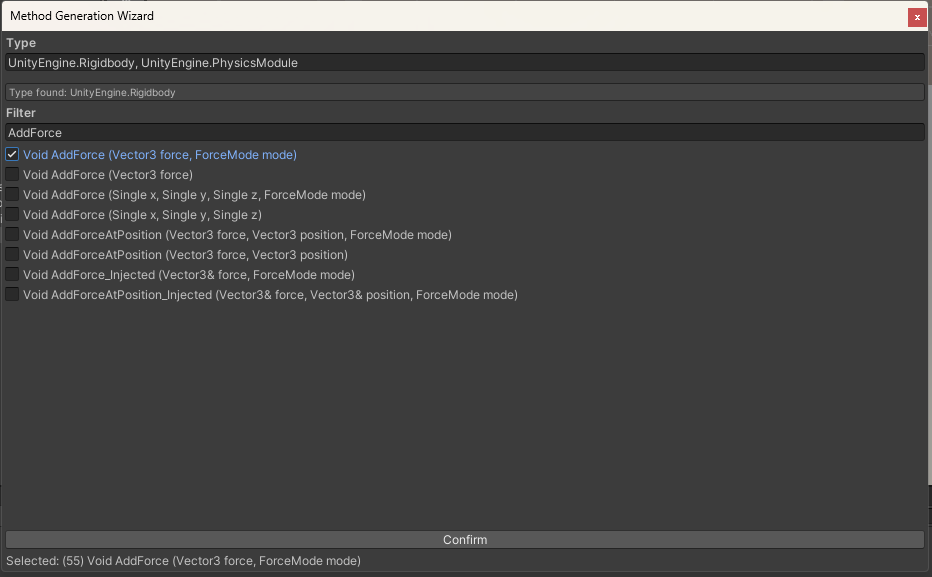
We need to identify which method we want to invoke first. For this guide, we’ll use Rigidbody.AddForce(Vector3 force, ForceMode mode) as an example.
-
Identify and get our parameters
We need to identify the type of each parameter and get it. From now on, we’ll refer to the safeReflectors.GetType(...)asGetType()The method we chose has two parameters:
- UnityEngine.Vector3, UnityEngine.CoreModule
- UnityEngine.ForceMode, UnityEngine.PhysicsModule
We’ll simply do two
GetType()calls. It should look like this: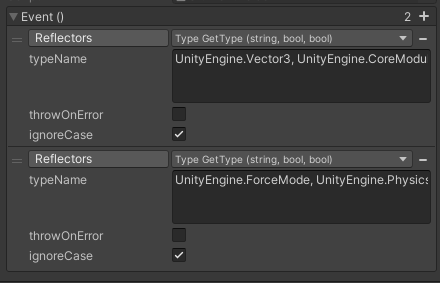
-
Setup our parameter array
Reflectors has the following implementation:
public static MethodInfo GetMethod(Type type, string methodName, Type[] parameterTypes)As you can see, we need to get an array populated with the parameter types we just got. We do this by getting the type of.. type! Confusing, but it’ll make sense in a moment.
We have the following property:Reflectors.TypeOfTypewhich returnstypeof(Type)
We’ll get it, and then callSystem.Array.CreateInstance(Type type, int length)with the type being TypeOfType, and the length being 2 (because we have two parameters).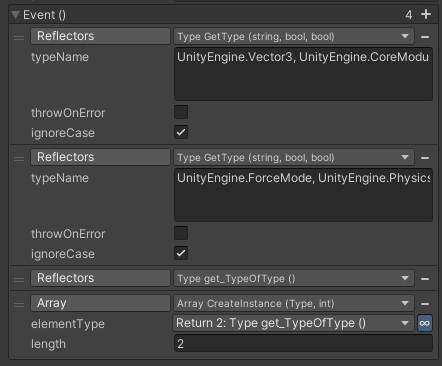
-
Filling the array
We need to fill the array we just created with the types we got earlier. We have two ways to do this. We can either use theAccessors.SetArrayElement()or aSystemObjectListHolder(See New Components). For now we’ll use the former as it is inline and easy to use. Methods that haveoutparameters will be covered in a later section.We’ll create a
SetArrayElement()call for each type, targeting the array we just created and setting the index according to the position of the parameter. Here’s our current setup: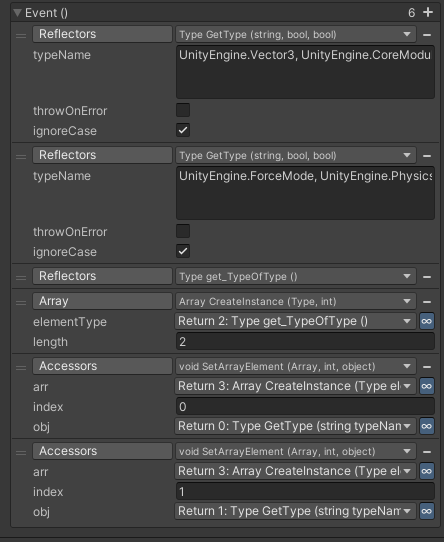
-
Getting the method
Now we almost have everything ready to get theMethodInfoto later invoke it! We just need to get the declaring type of the method usingGetType(). In our case, it isUnityEngine.Rigidbody, UnityEngine.PhysicsModule.
Finally, we can callReflectors.GetMethod(Type type, string methodName, Type[] parameterTypes)(For now we will not be dealing with generics, make sure to choose this specific overload). Link thetypeto the declaring type we just got and theparameterTypesto the array containing the parameter types. Also make sure to fill out themethodName. You now officially have theMethodInfo! Hard part’s over.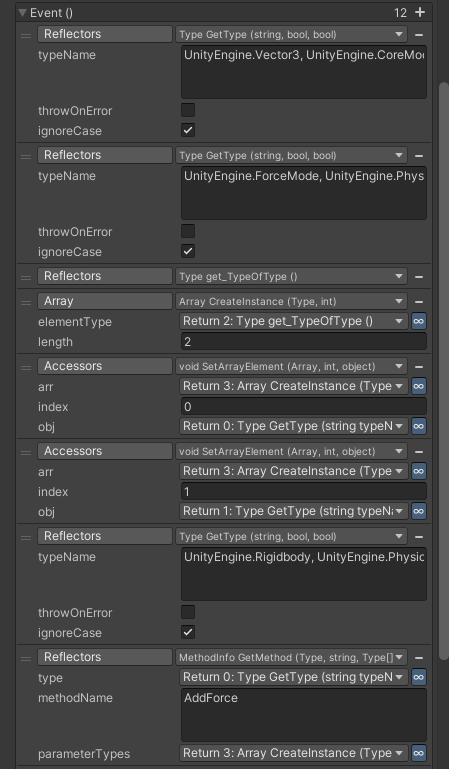
It’s very important we cache our MethodInfos so that we are not burning performance every time we are trying to get it again, when instead we can just get it once, store it, and use it as many times as we’d like.
-
Caching
To cache ourMethodInfo, we use aSystemObjectHolder(See New Components). You can either add it to the GameObject you’re working on right now or have separate objects so you don’t get confused later on.
We just plug it into a new call, navigate toBase Types -> UltEvents.ValueHolder<object>and then choose HeldValue. All we have to do is set it to theMethodInfowe just got.Invoking the method also requires an array of
objectcontaining the actual values. Since we want to reduce allocation calls to the bare minimum, we’ll create the array now and cache it.
We’ll go ahead and add anotherSystemObjectHolder, and then callGetType("System.Object, mscorlib") to get the type of system object.
Then, we again useArray.CreateInstance()but this time using theobjecttype. The length is the same as the previous array, and in our case it is 2.
Exactly like before, navigate toBase Types -> UltEvents.ValueHolder<object>, choose HeldValue and set it to the newly created array. Make sure you choose the correct holder. Eventually, it should look like this: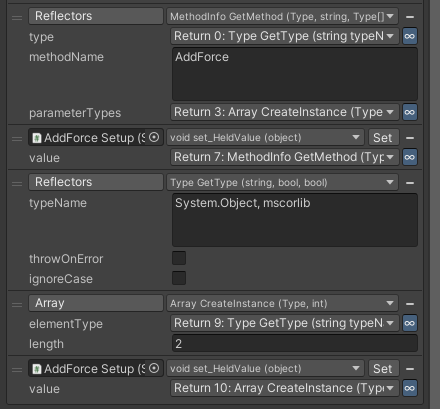
-
Invoking
We can finally invoke our method. To do this, we create a separate UltEvent
Now, get theHeldValuefrom theSystemObjectHoldercontaining the parameter array.
We can again useAccessors.SetArrayElement()to populate the array with the values we want to pass into the method. Here’s what that looks like: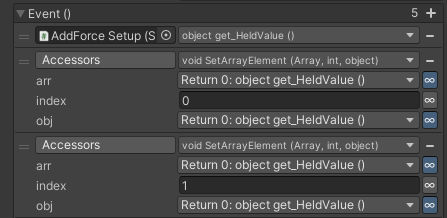
You can either use returned values directly, or use Debug Mode to work with serialized values instead. Since Vector3s and Enums can be serialized, we’ll go with debug mode here.
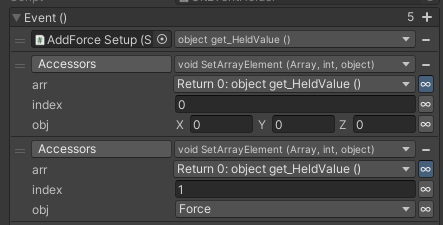
All we have to do now is get the stored
MethodInfofrom earlier, and then callReflectors.Invoke()! Like we did before, we’ll choose the overload that does not containmethodGenerics. Plug in the returned parameter array and the returnedMethodInfo.
The target is well.. your target!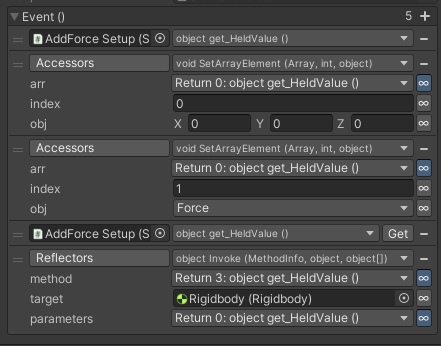
(Debug Mode was used to set the target as aUnityEngine.Object. You wouldn’t normally useReflectors.Invoke()on objects that exist in editor).That’s it! For static methods, you just leave the target as
null.
Invoking generic methods or methods that useoutparameters will be covered later.The setup needs to be called once before invoking. You can use
LifeCycleEvents, or add a check that calls the setup the first time you invoke the method.
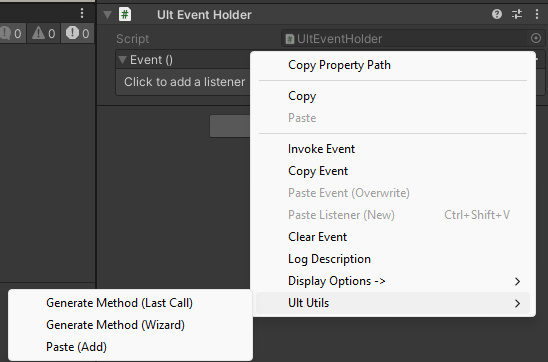
We’ve updated UltUtils with an automatic method generator to make this process super quick and easy while making sure it is as performant as possible. Simply right click any UltEvent and then navigate to Ult Utils -> Generate Method (Wizard)
Using out parameters
An out parameter is essentially a by reference parameter similar to ref and in.
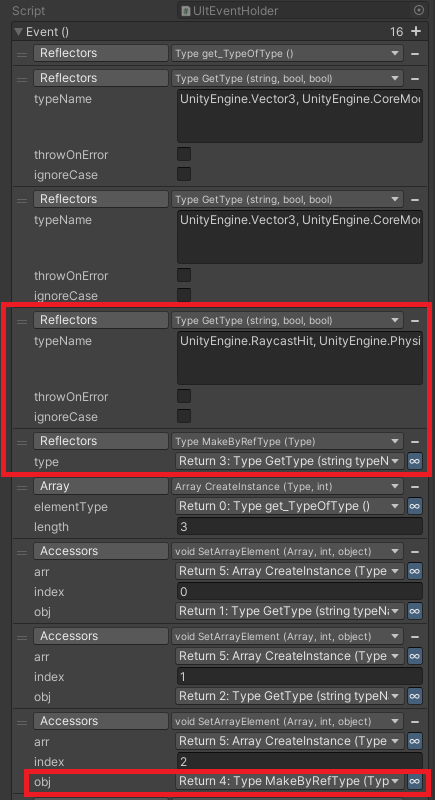
When using Reflectors.GetMethod(), you need to represent the parameter as a a by reference type. You can use Reflectors.MakeByRefType(Type type) to convert an actual ‘normal’ type to a by reference type.
After converting the type, you just populate the parameter type array exactly like you would normally but with the converted type instead.
Example with UnityEngine.Physics.Raycast(Vector3 origin, Vector3 direction, out RaycastHit hitInfo):
As for invoking, create the parameter array as you normally would, with a length equal to the total number of parameters, including out parameters.
Leave out entries null.
Simply firing invoke will populate it’s parameter entry which you can later get using Accessors.GetArrayElement(). That’s it!